
Agent Harness 工程:多工具调用与工具注册表
Agent Harness 工程:多工具调用与工具注册表
上一篇我们从一次普通 LLM 调用开始,一步步加上了 tools、tool_calls、tool 消息和循环,最后得到一个最小可运行的 Agent Loop。
不过上一篇只有一个工具:bash。
这当然可以说明工具调用的基本机制,但真实 Agent 很少只靠一个工具完成任务。一个编程助手至少需要读取文件、列出目录、写入文件、修改文件;一个数据助手可能还需要查询数据库、读取表格、调用 HTTP API;一个浏览器 Agent 则需要点击、输入、截图和等待页面状态变化。
所以这一篇继续沿着上一章的代码往前走:从一个工具扩展到多个工具,并把工具调用从大段 if/elif 改造成工具注册表。
从单工具到多工具
先回忆上一章的核心循环:
- 用户消息进入
messages。 - 模型返回普通回答,或者返回
tool_calls。 - Harness 根据
tool_call.function.name找到真实函数。 - Harness 执行工具,并把结果作为
role: "tool"写回messages。 - 模型看到工具结果后继续推理。
这个循环不需要因为工具变多而改变。真正需要扩展的是两部分:
- 工具实现:真实的 Python 函数,比如
read_file()、write_file()。 - 工具说明:传给模型的
TOOLS,告诉模型工具名称、用途和参数结构。
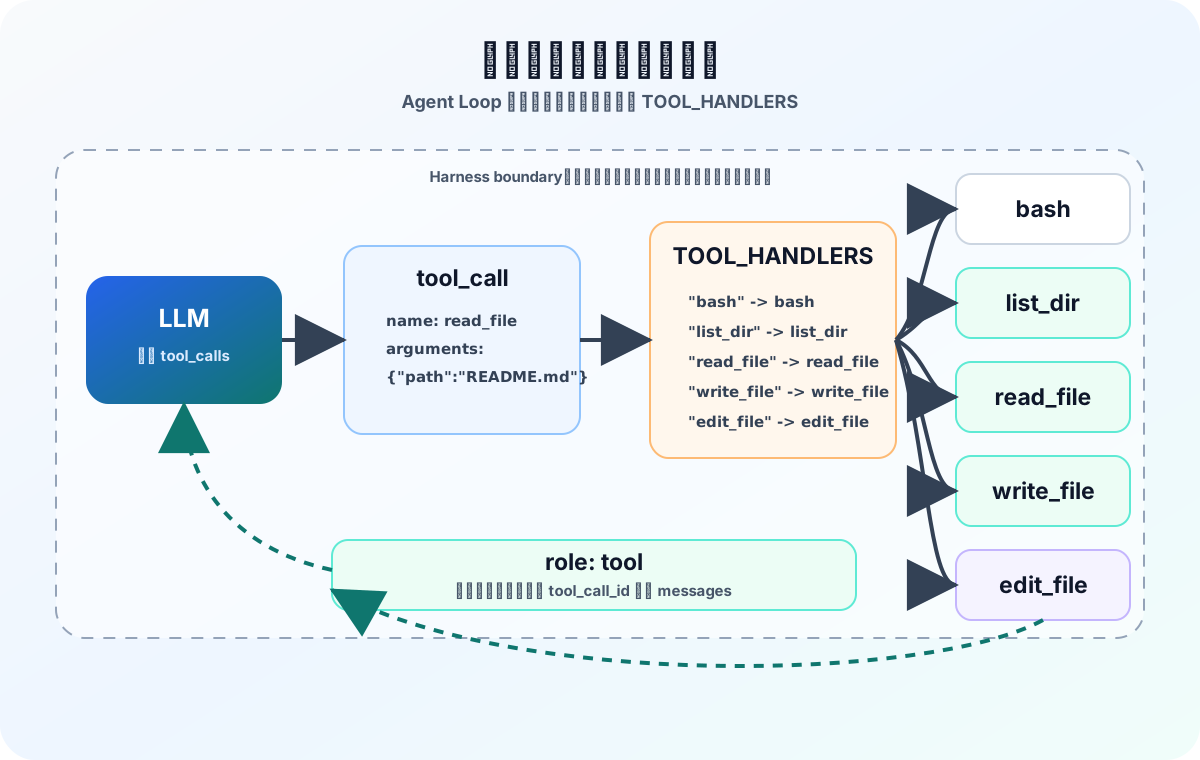
多工具 Agent 的关键不是让模型“执行更多东西”,而是让 Harness 能按工具名稳定分发到不同处理函数。
为什么不要只靠 bash
既然已经有 bash,为什么还要单独定义读取文件、写入文件、列目录这些工具?
因为 bash 太强,也太宽。它既能 ls,也能 cat,还能做很多危险动作。对于模型来说,一个宽泛工具虽然“自由”,但也意味着参数空间巨大、失败模式复杂、安全边界模糊。
相比之下,专用工具更适合 Agent:
read_file(path, limit)的意图比bash("sed -n ...")清楚;write_file(path, content)的参数结构比拼 shell 命令稳定;edit_file(path, old_text, new_text)更容易做安全检查;list_dir(path)的输出可以控制格式,减少模型解析成本。
工具不是越万能越好。很多时候,工具越窄,Agent 越稳。
先定义几个文件工具
这一篇先在上一章 bash 的基础上,再定义四个文件类工具:
| 工具 | 作用 |
|---|---|
list_dir | 列出目录内容 |
read_file | 读取文件内容 |
write_file | 写入或创建文件 |
edit_file | 按旧文本替换一处内容 |
代码如下:
import json
import os
import subprocess
from pathlib import Path
from typing import Any, Callable

from openai import OpenAI


client = OpenAI(
    base_url="http://localhost:8080/v1",
    api_key="no-need",
)

MODEL = "gpt-oss-20b-Q4_K_M.gguf"
WORKDIR = Path(os.getcwd()).resolve()


def bash(command: str) -> str:
    """Execute a bash command and return the output."""
    dangerous_keywords = ["rm", "sudo", "shutdown", "reboot", "init", "poweroff"]
    if any(keyword in command for keyword in dangerous_keywords):
        return "Error: command contains dangerous keywords."

    try:
        result = subprocess.run(
            command,
            shell=True,
            cwd=WORKDIR,
            capture_output=True,
            text=True,
            timeout=120,
        )
        output = (result.stdout + result.stderr).strip()
        return output[:5000] if output else "执行完成,但没有输出。"
    except subprocess.TimeoutExpired:
        return "Error: command execution timed out."
    except Exception as exc:
        return f"Error: an unexpected error occurred - {exc}"


def safe_path(path: str) -> Path:
    target = (WORKDIR / path).resolve()
    if not target.is_relative_to(WORKDIR):
        raise ValueError(f"Unsafe path: {path}")
    return target


def list_dir(path: str = ".") -> str:
    try:
        target = safe_path(path)
        if not target.exists():
            return f"Error: path does not exist - {path}"
        if not target.is_dir():
            return f"Error: path is not a directory - {path}"

        items = []
        for child in sorted(target.iterdir(), key=lambda item: item.name):
            suffix = "/" if child.is_dir() else ""
            items.append(f"{child.name}{suffix}")

        return "\n".join(items) if items else "目录为空。"
    except Exception as exc:
        return f"Error: {exc}"


def read_file(path: str, limit: int = 200) -> str:
    try:
        target = safe_path(path)
        if not target.exists():
            return f"Error: file does not exist - {path}"
        if not target.is_file():
            return f"Error: path is not a file - {path}"

        text = target.read_text(encoding="utf-8")
        lines = text.splitlines()
        if limit > 0 and len(lines) > limit:
            lines = lines[:limit] + [f"... ({len(lines) - limit} more lines)"]
        return "\n".join(lines)[:50000]
    except Exception as exc:
        return f"Error: {exc}"


def write_file(path: str, content: str) -> str:
    try:
        target = safe_path(path)
        target.parent.mkdir(parents=True, exist_ok=True)
        target.write_text(content, encoding="utf-8")
        return f"Wrote {len(content)} characters to {path}"
    except Exception as exc:
        return f"Error: {exc}"


def edit_file(path: str, old_text: str, new_text: str) -> str:
    try:
        target = safe_path(path)
        if not target.exists():
            return f"Error: file does not exist - {path}"
        if not target.is_file():
            return f"Error: path is not a file - {path}"

        content = target.read_text(encoding="utf-8")
        count = content.count(old_text)
        if count == 0:
            return f"Error: text not found in {path}"
        if count > 1:
            return f"Error: text is not unique in {path}, found {count} matches"

        target.write_text(content.replace(old_text, new_text, 1), encoding="utf-8")
        return f"Edited {path}"
    except Exception as exc:
        return f"Error: {exc}"
这里保留几个细节。
第一,safe_path() 很重要。模型生成的路径不能直接信任。../../somewhere 这种路径如果不处理,就可能逃出当前工作目录。这里用 resolve() 得到绝对路径,再用 is_relative_to(WORKDIR) 确认目标仍在工作目录里。
第二,read_file() 加了 limit。Agent 很容易因为一次读取大文件,把上下文塞满。文件读取工具最好默认有行数或字节数限制。
第三,edit_file() 要求 old_text 只出现一次。如果旧文本出现多次,直接替换第一处可能会改错位置。这个限制虽然保守,但对教学版 Agent 来说更容易解释,也更安全。
第四,bash 仍然只是教学示例。真实项目里,不要只靠关键词过滤来保护 shell 工具。
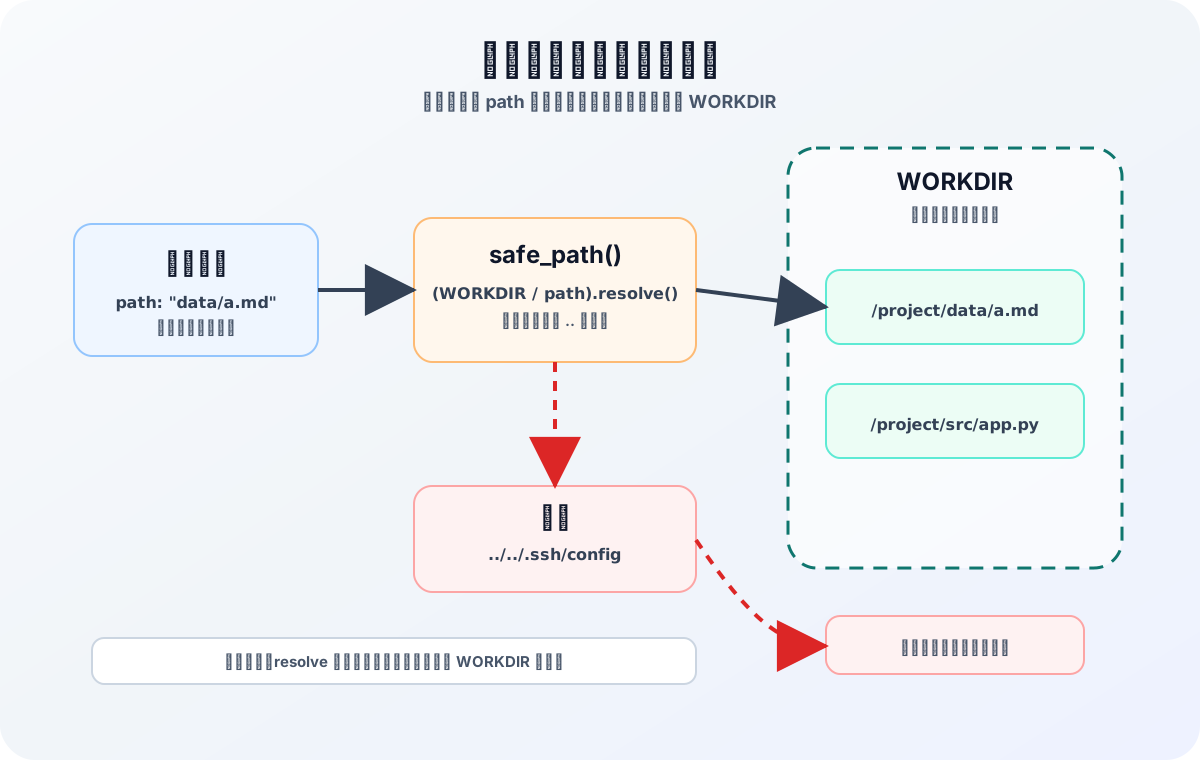
文件类工具的第一层安全边界,是把所有路径限制在工作目录内。
把工具说明给模型
实现了真实函数之后,还要扩充 TOOLS。这一步和上一篇完全一样:工具定义不是给 Python 解释器看的,而是给模型看的。
TOOLS = [
    {
        "type": "function",
        "function": {
            "name": "bash",
            "description": "Execute a shell command and return the output.",
            "parameters": {
                "type": "object",
                "properties": {
                    "command": {
                        "type": "string",
                        "description": "The shell command to execute.",
                    }
                },
                "required": ["command"],
            },
        },
    },
    {
        "type": "function",
        "function": {
            "name": "list_dir",
            "description": "List files and directories under a path.",
            "parameters": {
                "type": "object",
                "properties": {
                    "path": {
                        "type": "string",
                        "description": "Directory path relative to the current working directory.",
                    }
                },
            },
        },
    },
    {
        "type": "function",
        "function": {
            "name": "read_file",
            "description": "Read a UTF-8 text file with an optional line limit.",
            "parameters": {
                "type": "object",
                "properties": {
                    "path": {
                        "type": "string",
                        "description": "File path relative to the current working directory.",
                    },
                    "limit": {
                        "type": "integer",
                        "description": "Maximum number of lines to return. Defaults to 200.",
                    },
                },
                "required": ["path"],
            },
        },
    },
    {
        "type": "function",
        "function": {
            "name": "write_file",
            "description": "Write UTF-8 text content to a file, creating parent directories if needed.",
            "parameters": {
                "type": "object",
                "properties": {
                    "path": {
                        "type": "string",
                        "description": "File path relative to the current working directory.",
                    },
                    "content": {
                        "type": "string",
                        "description": "The full text content to write.",
                    },
                },
                "required": ["path", "content"],
            },
        },
    },
    {
        "type": "function",
        "function": {
            "name": "edit_file",
            "description": "Edit a file by replacing one unique old_text occurrence with new_text.",
            "parameters": {
                "type": "object",
                "properties": {
                    "path": {
                        "type": "string",
                        "description": "File path relative to the current working directory.",
                    },
                    "old_text": {
                        "type": "string",
                        "description": "The exact text to replace. It must appear exactly once.",
                    },
                    "new_text": {
                        "type": "string",
                        "description": "The replacement text.",
                    },
                },
                "required": ["path", "old_text", "new_text"],
            },
        },
    },
]
工具定义有两个方向要对齐。
一边要对齐模型:name、description、parameters 要足够清楚,让模型知道什么时候该选哪个工具。
另一边要对齐 Harness:工具名必须能映射到真实处理函数,参数名也要和处理函数的入参一致。比如 read_file 的 schema 里有 path 和 limit,真实函数也最好就是 read_file(path: str, limit: int = 200)。
第一版:用 if/elif 分发工具
工具变多之后,最直接的写法是在 Agent Loop 里判断工具名:
for tool_call in assistant_message.tool_calls:
    arguments = json.loads(tool_call.function.arguments)

    if tool_call.function.name == "bash":
        tool_result = bash(arguments["command"])
    elif tool_call.function.name == "list_dir":
        tool_result = list_dir(arguments.get("path", "."))
    elif tool_call.function.name == "read_file":
        tool_result = read_file(arguments["path"], arguments.get("limit", 200))
    elif tool_call.function.name == "write_file":
        tool_result = write_file(arguments["path"], arguments["content"])
    elif tool_call.function.name == "edit_file":
        tool_result = edit_file(
            arguments["path"],
            arguments["old_text"],
            arguments["new_text"],
        )
    else:
        tool_result = f"Error: unknown tool {tool_call.function.name}"
这个版本能跑,也很直观。但问题也明显:
- 每增加一个工具,都要改 Agent Loop;
- 工具分发逻辑和循环控制逻辑混在一起;
- 参数解析和错误处理会重复;
- 工具多了以后,
if/elif会越来越长。
Agent Loop 是 Harness 的核心路径,不应该因为新增一个普通工具就频繁改动。更好的方式,是把“工具名 -> 处理函数”的关系独立出来。
第二版:用 TOOL_HANDLERS 注册工具
我们可以增加一个工具注册表:
TOOL_HANDLERS: dict[str, Callable[..., str]] = {
    "bash": bash,
    "list_dir": list_dir,
    "read_file": read_file,
    "write_file": write_file,
    "edit_file": edit_file,
}
这个映射表的含义很直接:如果模型请求调用 read_file,Harness 就从 TOOL_HANDLERS["read_file"] 里取出真实函数,然后把解析出来的参数传进去。
这样做之后,可以把单个工具调用的执行过程封装成一个函数:
def run_tool_call(tool_call: Any) -> str:
    name = tool_call.function.name
    handler = TOOL_HANDLERS.get(name)
    if handler is None:
        return f"Error: unknown tool {name}"

    try:
        arguments = json.loads(tool_call.function.arguments or "{}")
    except json.JSONDecodeError as exc:
        return f"Error: invalid JSON arguments for {name} - {exc}"

    if not isinstance(arguments, dict):
        return f"Error: arguments for {name} must be a JSON object."

    try:
        return handler(**arguments)
    except TypeError as exc:
        return f"Error: invalid arguments for {name} - {exc}"
    except Exception as exc:
        return f"Error: tool {name} failed - {exc}"
这段代码承担了四件事:
- 根据工具名找到处理函数;
- 把模型生成的 JSON 字符串解析成 dict;
- 确认参数结构是 JSON object;
- 执行工具,并把异常转换成模型能读懂的文本结果。
这里再次强调:parameters 能帮助模型生成更接近正确的参数,但它不等于运行时安全。Harness 仍然要做解析、校验和错误处理。
改造后的 Agent Loop
有了 run_tool_call() 之后,Agent Loop 就能保持和上一篇几乎一样的结构:
SYSTEM_PROMPT = f"""
你是一个编程助手,工作在当前目录:{WORKDIR}。
你可以使用工具读取文件、列出目录、写入文件、编辑文件和执行必要的 shell 命令。
调用工具前先判断需要什么信息;拿到工具结果后,再决定是否继续调用工具或给出最终回答。
"""


def run_loop(user_message: str, max_steps: int = 8) -> str:
    messages: list[dict[str, Any]] = [{"role": "user", "content": user_message}]

    for _ in range(max_steps):
        response = client.chat.completions.create(
            model=MODEL,
            messages=[{"role": "system", "content": SYSTEM_PROMPT}] + messages,
            tools=TOOLS,
        )

        assistant_message = response.choices[0].message

        if not assistant_message.tool_calls:
            final_answer = assistant_message.content or ""
            messages.append({"role": "assistant", "content": final_answer})
            return final_answer

        messages.append(
            {
                "role": "assistant",
                "content": assistant_message.content or "",
                "tool_calls": [
                    {
                        "id": tool_call.id,
                        "type": "function",
                        "function": {
                            "name": tool_call.function.name,
                            "arguments": tool_call.function.arguments,
                        },
                    }
                    for tool_call in assistant_message.tool_calls
                ],
            }
        )

        for tool_call in assistant_message.tool_calls:
            tool_result = run_tool_call(tool_call)
            messages.append(
                {
                    "role": "tool",
                    "tool_call_id": tool_call.id,
                    "content": tool_result,
                }
            )

    return "达到最大循环次数,任务仍未完成。"


if __name__ == "__main__":
    user_input = input("Enter your message: ")
    output = run_loop(user_input)
    print("Response from LLM:", output)
注意这里仍然保留了上一篇的几个关键点:
- 没有
tool_calls时,说明模型给出了最终回答; - 有
tool_calls时,先把带有tool_calls的assistant消息写入历史; - 每个工具执行结果都用
role: "tool"写回; tool_call_id必须对应原来的tool_call.id;max_steps防止循环失控。
变化只有一个:Agent Loop 不再关心具体有哪些工具,它只负责遍历模型请求的工具调用,然后交给 run_tool_call()。
一轮里出现多个工具调用怎么办
上一篇已经提到过,assistant_message.tool_calls 是一个列表。也就是说,模型一轮里可能请求多个工具调用。
比如它可能同时请求:
list_dir({"path": "."})read_file({"path": "README.md", "limit": 80})
Harness 的处理方式很简单:遍历这个列表,为每个 tool_call 执行一次工具,并追加一条对应的 tool 消息。
这里最重要的是保持对应关系:
for tool_call in assistant_message.tool_calls:
    tool_result = run_tool_call(tool_call)
    messages.append(
        {
            "role": "tool",
            "tool_call_id": tool_call.id,
            "content": tool_result,
        }
    )
如果有两个工具调用,就应该追加两条 tool 消息。每条 tool 消息都用自己的 tool_call_id 指回对应的请求。不要把多个工具结果随便合并成一条普通文本,否则模型很难判断哪个结果对应哪个调用。
新增工具时要做什么
有了工具注册表之后,新增工具的步骤变得很固定。
假设后面要增加一个 http_get(url) 工具,大致只需要做三件事:
- 定义真实函数
http_get(url: str) -> str; - 在
TOOLS里添加工具说明,让模型知道它可以调用; - 在
TOOL_HANDLERS里添加"http_get": http_get。
Agent Loop 不需要改。
这就是注册表的价值:工具扩展发生在边缘,循环控制保持稳定。
当然,真实项目里可以继续往前走,把 TOOLS 和 TOOL_HANDLERS 合并成更完整的工具对象。例如每个工具都包含:
- 工具名;
- 工具描述;
- 参数 schema;
- 处理函数;
- 权限等级;
- 是否需要用户审批;
- 返回结果最大长度;
- 超时时间。
这时工具系统就不只是一个 dict,而会慢慢变成 Harness 里的一个核心模块。
小结
这篇在上一篇最小 Agent Loop 的基础上,继续做了三件事:
- 定义多个专用工具,让 Agent 不再只依赖
bash; - 用
TOOLS把每个工具的名称、描述和参数结构告诉模型; - 用
TOOL_HANDLERS把工具名映射到真实处理函数,让 Agent Loop 保持稳定。
到这里,我们已经有了一个更像样的工具系统雏形:模型负责选择工具,Harness 负责校验参数、执行函数、回传结果。
下一篇可以继续补上一个更关键的问题:权限与审批。当工具能力越来越强,Agent 什么时候可以直接执行,什么时候必须停下来问用户,什么时候应该被沙箱拦住?这会决定它能不能从 Demo 走向真实可用的工程系统。